Subfaro6 min read
How to manage your subscriptions with Claude
Manage your subscriptions with Claude: connect Subfaro in a minute, ask what you spend each month and add subscriptions just by chatting. Free and safe.

In this article
You can manage your subscriptions with Claude by adding Subfaro as a connector: in about a minute, you can ask "how much am I spending each month?" or say "I just subscribed to Spotify," and Claude checks or updates your account. The connector is free, Claude asks before it changes anything, and it can't delete anything. Here's how to connect it, what to ask, and where the limits are.
What the Subfaro connector is (and what MCP means)
Subfaro is a subscription tracker: you log what you pay for, and it shows your monthly total, alerts you before each charge, and works out the real cost of subscriptions billed in another currency.
The connector is the bridge between Subfaro and Claude. It uses MCP (Model Context Protocol), an open standard that lets an AI assistant use tools from other apps with your permission. In practice, it's like giving Claude a small set of clearly labeled buttons inside Subfaro: see spending, list subscriptions, look up prices, add and update. Nothing more.
You don't need to install anything or know how to code. All you need is a Subfaro account (you can sign in with Google) and Claude on the web, desktop or mobile.
How to connect Subfaro to Claude, step by step
It takes about a minute:
- Open claude.ai and go to Settings › Connectors.
- Find Subfaro in Claude's connector directory. Or choose Add custom connector and paste
https://app.subfaro.com/api/mcp. - Click connect.
- Sign in to your Subfaro account. If you don't have one yet, just sign in with Google.
- On Subfaro's permission screen, choose read-only or read and change, then confirm.
That's it: Subfaro now shows up among Claude's connectors. If you pick read-only, the change tools aren't even shown to Claude. You can switch later by reconnecting with the other option.
If you use Claude Code, you can also connect from the terminal; the details are on the Subfaro for Claude page.
Example prompts to try
Once the connector is on, just talk to Claude. Some prompts that work well:
- "How much am I spending on subscriptions per month, and which category costs the most?"
- "What gets charged in the next 7 days? Any free trial ending?"
- "I just subscribed to Paramount+ Premium, add it to Subfaro."
- "Netflix raised its price, update it to the new plan."
- "I canceled Disney+ today, mark it as canceled."
- "Which of my streaming services overlap? Where could I save?"
- "What plans does Hulu have, and how much is each?"
- "I'm splitting Spotify Family with my sister, update it to show my half."
You don't need special wording. Write the way you'd text a friend who keeps your budget, and Claude figures out which Subfaro tool to use. If something is ambiguous, like which Netflix plan you're on, it asks instead of guessing.
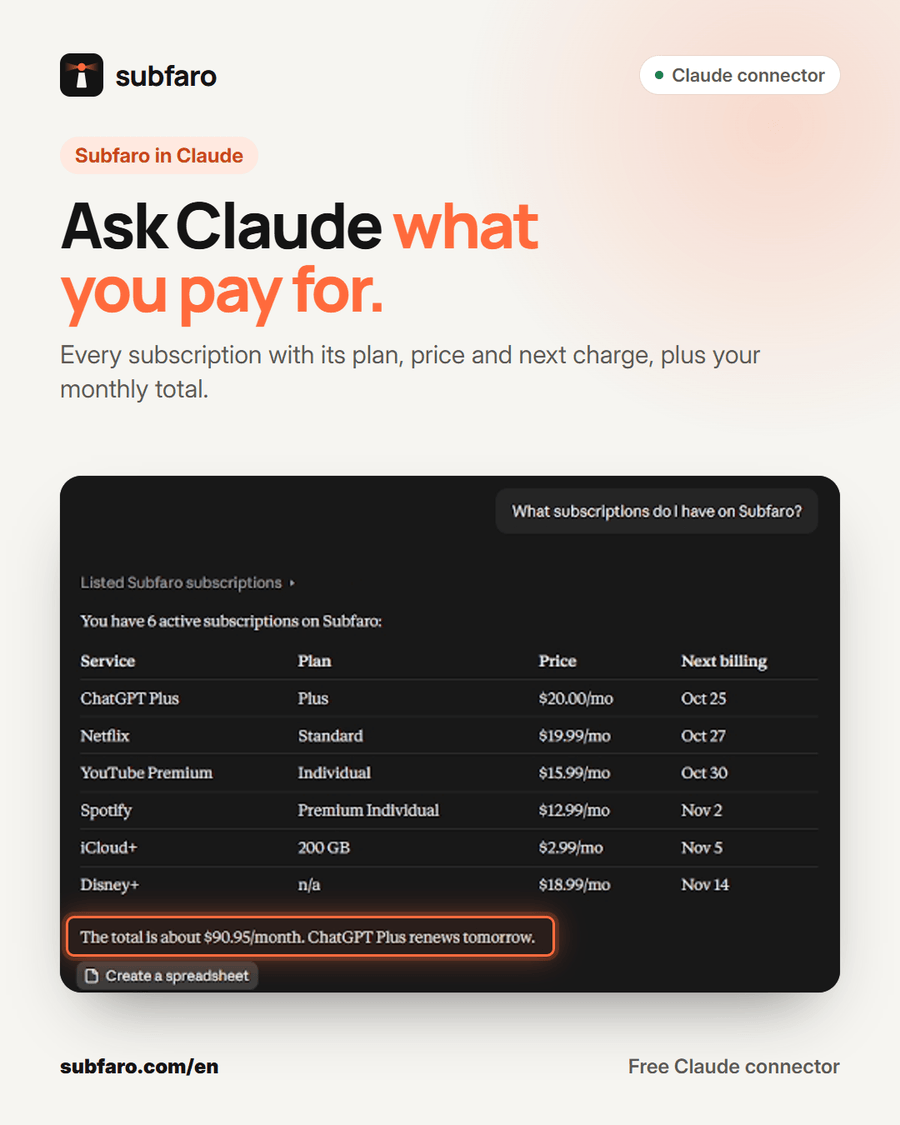
When you ask Claude to add a subscription, it looks the service up in Subfaro's catalog, which already has current plans and prices for your country. If the plan isn't clear, it asks first. For subscriptions billed in another currency, Subfaro calculates the real cost, including the exchange rate and card fees.
What Claude can and can't do
The connector is designed to be useful without taking control away from you.
| Claude can | Claude can't |
|---|---|
| Show your spending summary by month, year and category | Delete subscriptions or your account |
| List your subscriptions with price, real cost and next charge | Make changes without your confirmation |
| Look up services, plans and prices in the catalog | Cancel a subscription with the provider for you |
| Add and update subscriptions (plan, price, date, pause) | See your Subfaro password |
| Mark a subscription as canceled in Subfaro | Move money or access bank or card details |
Three things are worth knowing:
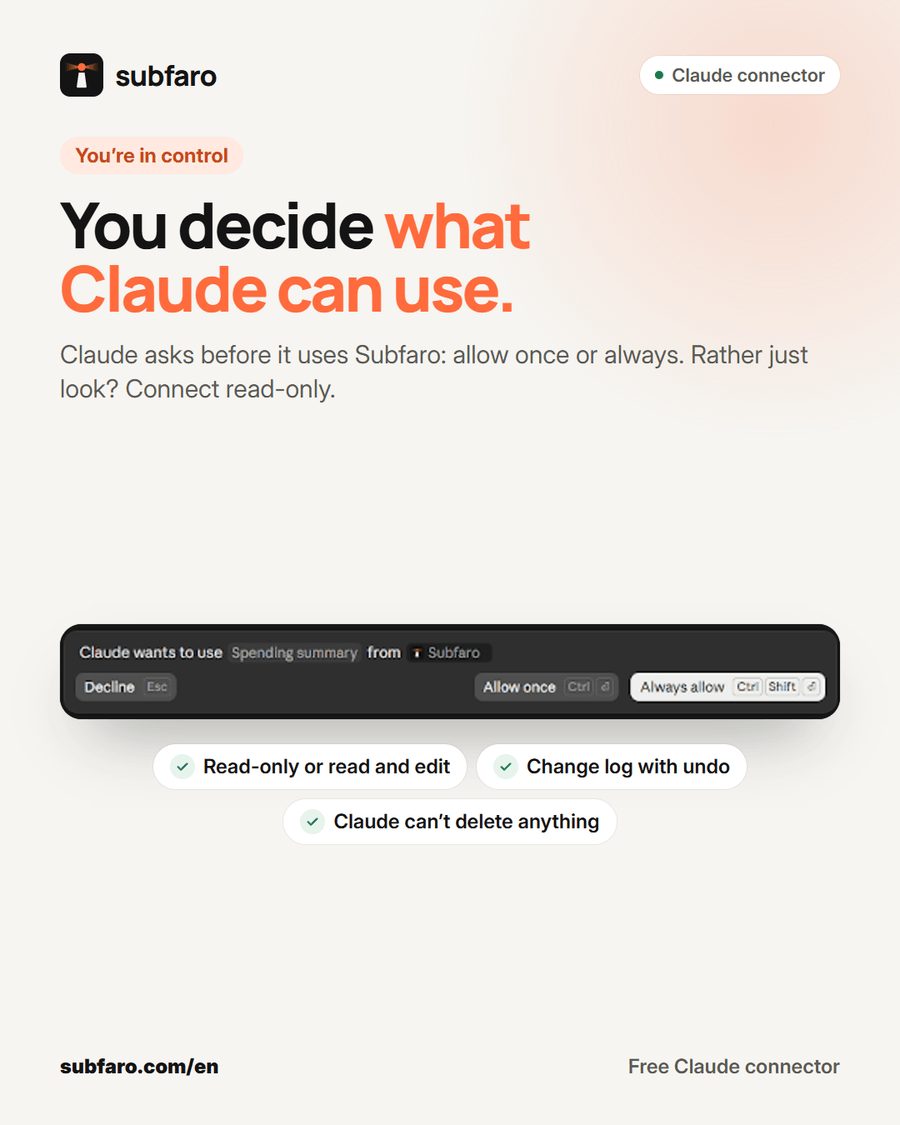
- It asks before changing anything. Before adding or editing a subscription, Claude shows you the data it's about to save and waits for your OK. Claude itself also asks whether to allow each Subfaro tool once or always.
- Everything can be undone. Every change Claude makes is logged in Subfaro under Settings › Integrations, with an Undo button, and the subscription is tagged "via Claude."
- "Mark as canceled" doesn't cancel with the provider. It only updates your records in Subfaro. To stop the charges, you have to cancel with the service itself, and Claude shows you its official cancel link.
Tips to get more out of it (and fix common issues)
A few ideas to make the connector a habit, not just a novelty:
- Start read-only. If you want to see how it works first, connect read-only and stick to questions. When you're comfortable, reconnect with read and change.
- Do a month-end review. Ask "list my subscriptions by real cost, most expensive first" and decide what's still worth it.
- Log it the moment you subscribe. Just signed up for something? Tell Claude in the same conversation, so no charge slips past your records.
- Ask about free trials. "Does any free trial of mine end this week?" is a simple question that helps you avoid unwanted charges.
- Use the chat to compare. Ask Claude to group your subscriptions by category and point out services that do similar things.
If Claude stops reaching Subfaro, go to Settings › Connectors in Claude, disconnect Subfaro and connect again, signing in with your account. If you hit the 10-subscription limit, you can mark one you no longer use as canceled or upgrade to Pro.
Privacy: what Claude can see
When connected, Claude can read your subscription names, amounts, dates and spending summary, only what it needs to answer what you ask. That data is also processed by Anthropic under the Anthropic privacy policy.
Subfaro never hands your password to the assistant, never asks for bank or card details, and doesn't connect to your bank account. You can disconnect anytime: in Subfaro under Settings › Integrations, or in Claude's connector settings. Access is revoked immediately.
Does it work on the free plan?
Yes. The Claude connector is part of Subfaro's Free plan, which has no time limit and tracks up to 10 subscriptions. On that plan, Claude can add subscriptions until you reach 10 active ones.
If you have more, Pro ($2.99/mo or $24.99/yr) unlocks unlimited subscriptions, plus custom categories and YouTube memberships and Twitch subs. You don't need to reconnect Claude after upgrading. See plans and pricing for details.
How Subfaro helps
Claude is great for quick questions and for logging a subscription without filling out a form. Subfaro handles the rest on its own: it alerts you before each charge and before a free trial ends, checks prices for about 30 services every week and tells you when one changes, and shows the real cost of foreign-currency subscriptions.
If you're not using it yet, create your free account and connect Claude right after. In a few minutes you'll have a complete picture of what you pay every month, and you can ask about it in plain English.
FAQ
Does the Subfaro connector for Claude cost anything?
No. The connector works on Subfaro's Free plan, which tracks up to 10 subscriptions. Pro removes that limit, and you don't need to reconnect after upgrading.
Can Claude cancel a subscription for me?
No. Marking a subscription as canceled only records it in Subfaro. To actually stop the charges, use the provider's own cancel link, which Claude shows you.
Can Claude delete my subscriptions?
No. The connector has no delete tool, Claude asks for your confirmation before any change, and every change can be undone in Subfaro.
How do I disconnect Claude from Subfaro?
In Subfaro, go to Settings › Integrations and disconnect Claude; access is revoked immediately. You can also remove the connector in Claude's settings.
Keep reading
All articles →
Money6 min read
Free Trial Ending? How to Avoid Being Charged
How to avoid free trial charges: set reminders, cancel right after signing up, use virtual cards, handle App Store trials and what to do if you were charged.

Guides6 min read
How to Cancel Subscriptions: Netflix, Spotify, Hulu and More
How to cancel subscriptions in the US: the path and official cancel link for Netflix, Spotify, Prime, Hulu, Max and more, plus refunds and remaining time.

Money6 min read
Splitting subscriptions: family and duo plans, cost per person
See which services offer family or duo plans, what each person really pays, the same-household rules, and how to split subscriptions and collect fairly.