Money6 min read
Foreign transaction fees on subscriptions: the real cost
Foreign transaction fees can quietly add up to 3% to subscriptions billed in another currency. Learn how FX fees and DCC work and how to stop paying them.

In this article
- What a foreign transaction fee is
- When subscriptions trigger foreign transaction fees
- Dynamic currency conversion: the "pay in your currency" trap
- How much foreign transaction fees add to common subscriptions
- How to avoid foreign transaction fees on subscriptions
- Tips for travelers and international users
- How Subfaro helps
If a subscription is billed in a foreign currency, or by a company based abroad, your card may add a foreign transaction fee of up to about 3% every single month. On top of that, a "pay in your currency" option at checkout can hide a worse exchange rate. Here is how foreign transaction fees on subscriptions work, what they really cost, and how to avoid most of them.
What a foreign transaction fee is
A foreign transaction fee (often called an FX fee) is a percentage your card issuer charges when a purchase involves another country or currency. Capital One describes it as typically 1%–3% of the transaction amount, and notes it can apply when you buy online from a foreign merchant without leaving home.
In the US, the Consumer Financial Protection Bureau's Regulation Z commentary treats these fees as finance charges. It covers fees on transactions made in a foreign currency and also on US-dollar transactions with a foreign merchant (CFPB, Regulation Z §1026.4 commentary). So "it's charged in dollars" does not always mean "no fee".
The fee usually has two parts:
- Network conversion: the card network converts the amount at its own exchange rate.
- Issuer fee: your bank adds its percentage on top. Some issuers charge nothing here.
When subscriptions trigger foreign transaction fees
Subscriptions are easy to miss because the fee is small and repeats quietly. Common situations:
- You live in the US and subscribe to a foreign service: a European newspaper, a UK streaming add-on, a design tool from a company billing from abroad.
- You live outside the US and pay for US-dollar tools: AI assistants, coding tools and cloud services are often priced in dollars worldwide.
- You travel or moved abroad: your home subscriptions usually keep billing in your home currency, but signing up for a local service, or switching your app store country, can move a charge into another currency.
- The merchant's payment processor is abroad: the price looks local, but the transaction is processed in another country, and some issuers still charge the fee.
Dynamic currency conversion: the "pay in your currency" trap
Dynamic currency conversion (DCC) is when a merchant or its payment processor offers to charge you in your home currency instead of theirs. It sounds convenient: you see the exact amount right away. The catch is that they choose the exchange rate, and it can include a markup that is larger than your card's own conversion.
For a one-time purchase, that is a small loss. For a subscription, you repeat it every billing cycle. A good rule of thumb:
- If your card has no foreign transaction fee, paying in the merchant's own currency and letting the card network convert is usually the cheaper option.
- If the service offers a real local price (a set price list for your country, not a conversion at checkout), compare that price with the converted one. Local pricing can be cheaper, or more expensive.
- If you are not sure which one you are seeing, check whether the "local" amount changes from month to month. A fixed local price stays the same; a converted one moves with the exchange rate.
How much foreign transaction fees add to common subscriptions
Here is what a 1% or 3% fee adds to popular plans, using US prices from the Subfaro catalog (prices checked in October 2026). This is the situation of someone outside the US paying in dollars, or of anyone whose issuer treats the merchant as foreign.
| Service and plan | Price | Fee at 1% | Fee at 3% | Extra per year at 3% |
|---|---|---|---|---|
| ChatGPT Plus | $20.00/mo | $0.20 | $0.60 | $7.20 |
| Claude Pro | $20.00/mo | $0.20 | $0.60 | $7.20 |
| Cursor Premium | $30.00/mo | $0.30 | $0.90 | $10.80 |
| Netflix Standard | $19.99/mo | $0.20 | $0.60 | $7.20 |
| Spotify Premium Individual | $12.99/mo | $0.13 | $0.39 | $4.68 |
| GitHub Copilot Pro | $10.00/mo | $0.10 | $0.30 | $3.60 |
On its own, $0.60 a month is not dramatic. But a stack of two $20 AI tools and a $10 coding assistant ($50/mo) costs an extra $1.50 a month at 3%, or $18 a year, for nothing. And that is before any exchange-rate markup from DCC, which is not included in this table.
If you want the full picture, the Subfaro calculator totals what your subscriptions cost per month and per year.
How to avoid foreign transaction fees on subscriptions
1. Put foreign subscriptions on a no-FX-fee card
This is the single biggest fix. Many credit cards, especially travel cards, charge no foreign transaction fee. Check your card's pricing table (look for "foreign transaction" in the terms) and move every foreign or foreign-currency subscription to the card that charges nothing.
2. Pay in the merchant's currency, not through DCC
When a checkout page asks whether you want to pay in your currency or theirs, pick theirs if your card has no FX fee. If you already accepted DCC, you can often change the billing currency or payment method in the account's billing settings.
3. Use local pricing when it is genuinely local
Some services publish different price lists per country. A real local price billed by a local entity avoids both the conversion and the fee. Compare it with the converted price before switching, because local prices are not always lower.
4. Consider app store billing
Subscribing through the App Store or Google Play usually bills you in the currency of your store account. That can remove the foreign fee, but app store prices are sometimes higher. YouTube Premium Individual, for example, is $15.99/mo directly and $20.99/mo via the App Store. Compare the two numbers first.
5. Switch to annual billing for tools you keep
Annual plans often come with a discount, and you pay the fee once instead of twelve times (it is still a percentage, so the total fee shrinks only as much as the price does). It also locks in a single exchange rate for the year, which can work for or against you. Only go annual for tools you are sure you will use all year.
6. Check your statement for the fee line
Many issuers list the foreign transaction fee as a separate line next to the charge. If you see one under a subscription you thought was domestic, that tells you the merchant is processed abroad. A periodic statement review also catches charges you forgot about; our guide on how to find forgotten subscriptions on your credit card statement walks through it.
Tips for travelers and international users
- Before a long trip, list the subscriptions you will keep, pause or cancel the ones you will not use and make sure the rest are on a no-FX-fee card.
- If you move countries, review each subscription's billing currency. Some services require a payment method from the new country; others keep billing in the old currency.
- Keep one currency per card when you can. It makes statements easier to read and fees easier to spot.
- Track renewal dates. Annual renewals in a foreign currency are the ones most exposed to a bad exchange-rate day.
How Subfaro helps
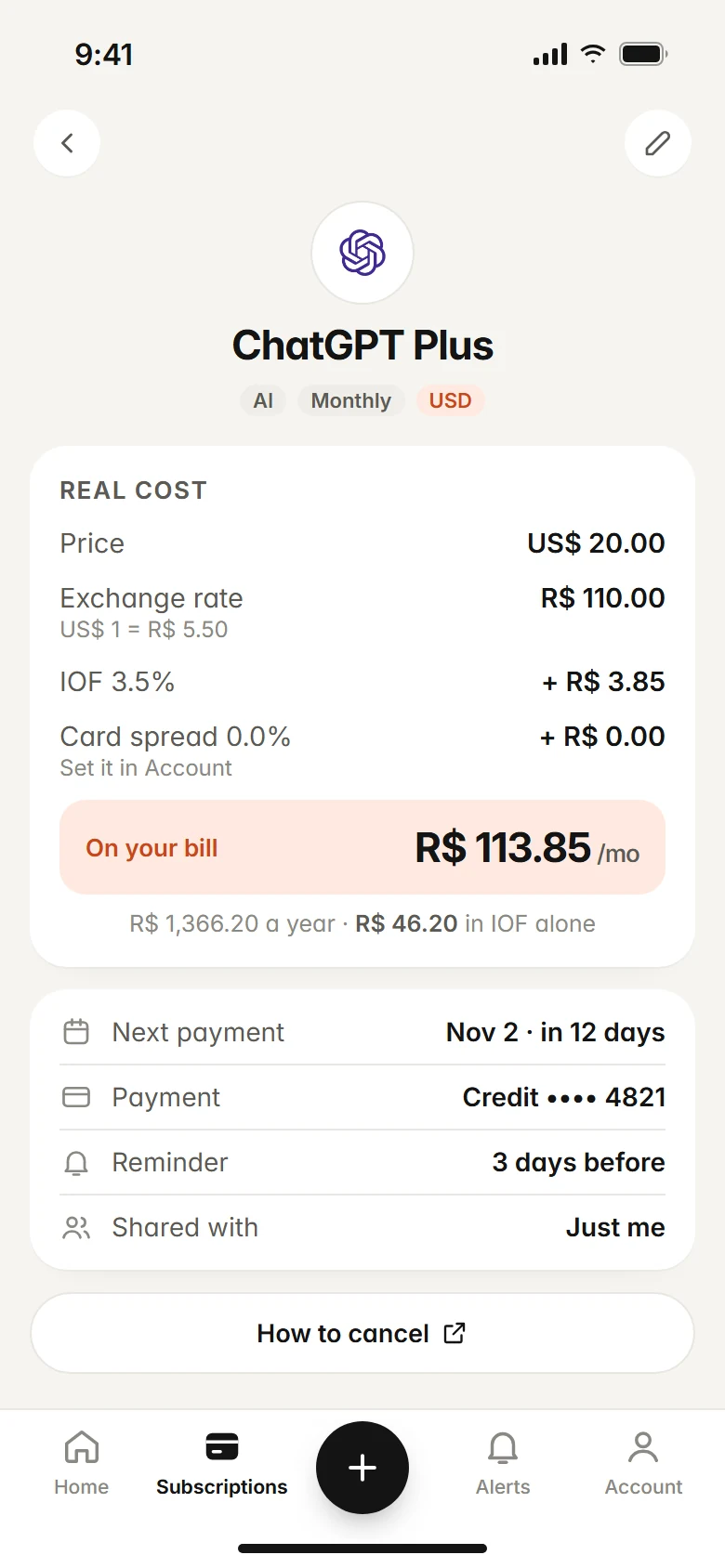
Subfaro is a subscription tracker that keeps all of this in one place. Pick the service and plan and the price fills in; prices for about 30 services are checked weekly, with alerts when they change, and you get a reminder before every charge and before free trials end. For subscriptions in another currency, Subfaro shows the real cost including the exchange rate.
The free plan has no time limit and covers up to 10 subscriptions. You can also ask Claude about your spending with the free Subfaro connector for Claude. Create a free account or compare plans.
FAQ
Do foreign transaction fees apply to online subscriptions?
They can. Many card issuers charge the fee on purchases in a foreign currency and also on purchases from merchants based abroad, even if you never leave home and the charge is in US dollars.
How much is a typical foreign transaction fee?
Card issuers typically charge between 1% and 3% of the transaction, and many charge around 3%. Some cards charge no foreign transaction fee at all, so check your card's terms.
Should I accept a charge in my home currency when a site offers it?
Not automatically. That offer is often dynamic currency conversion, where the merchant or its processor sets the exchange rate, and the rate can include a markup. Compare it with paying in the merchant's currency on a card with no foreign transaction fee.
How do I know if a subscription is charging me a foreign transaction fee?
Look at your statement around the subscription's billing date. Many issuers list the fee as a separate small line next to the charge, or show the original currency and conversion rate in the transaction details.
Keep reading
All articles →
Money6 min read
Free Trial Ending? How to Avoid Being Charged
How to avoid free trial charges: set reminders, cancel right after signing up, use virtual cards, handle App Store trials and what to do if you were charged.

Money6 min read
Splitting subscriptions: family and duo plans, cost per person
See which services offer family or duo plans, what each person really pays, the same-household rules, and how to split subscriptions and collect fairly.

Guides6 min read
How to Cancel Subscriptions: Netflix, Spotify, Hulu and More
How to cancel subscriptions in the US: the path and official cancel link for Netflix, Spotify, Prime, Hulu, Max and more, plus refunds and remaining time.