Guides6 min read
Spreadsheet or app to track subscriptions? An honest comparison
Spreadsheet or app to track subscriptions? A copy-ready spreadsheet template, its real limits, what a dedicated app adds and when a spreadsheet is enough.

In this article
Spreadsheet or app to track subscriptions? A well-built spreadsheet works if you have a few subscriptions and the discipline to review it. An app is worth it when you want to be warned before charges, catch price increases and see the real cost of foreign-currency subscriptions without doing the math. Below is a copy-ready template, where it falls short and when it makes sense to switch.
A subscription tracker spreadsheet template
Copy these columns into Google Sheets or Excel. The example rows use prices from Subfaro's catalog, checked in October 2026:
| Service | Plan | Amount | Currency | Billing cycle | Next charge | Card | Shared with | Cancel link |
|---|---|---|---|---|---|---|---|---|
| Netflix | Standard | 19.99 | USD | monthly | 11/12/2026 | Credit ending 4821 | — | netflix.com/cancelplan |
| Spotify | Premium Family | 21.99 | USD | monthly | 11/18/2026 | Credit ending 4821 | Ana, Leo, Bia | spotify.com/account/subscription |
| ChatGPT Plus | Plus | 20.00 | USD | monthly | 11/02/2026 | Credit ending 4821 | — | chatgpt.com/#settings/Subscription |
| Microsoft 365 | Family yearly | 129.99 | USD | yearly | 03/03/2027 | Debit | Parents | account.microsoft.com/services |
Each column earns its place:
- Amount, currency and billing cycle let you add everything up correctly, without mixing yearly and monthly charges.
- Next charge is what prevents surprises on your statement.
- Card helps when a card expires or gets replaced: you know exactly what needs updating.
- Shared with shows who owes you a share (see splitting subscriptions on family plans).
- Cancel link saves you the hunt on the day you decide to leave.
Useful formulas
Add two calculated columns at the end:
- Monthly equivalent:
=IF(E2="yearly",C2/12,C2). Microsoft 365 Family yearly at $129.99 becomes $10.83 a month. - My share: divide the monthly amount by the number of people, you included. Spotify Family shared with three other people comes to $5.50 each.
If you pay for something in another currency, Google Sheets can fetch the rate with =GOOGLEFINANCE("CURRENCY:EURUSD") (swap in the currencies you need). Multiply the amount by that rate, then add any foreign transaction fee or spread your card charges, which you'll find in your card's terms. For the full picture, see foreign transaction fees on subscriptions.
Where to find the data for each subscription
The hardest part is the first pass: finding everything you pay for. Three sources cover almost every case:
- The last 12 months of card statements. Twelve months so the yearly charges show up too, since those are the easiest to forget. Look for amounts that repeat under the same merchant name.
- App stores. The App Store and Google Play each keep a list of the active subscriptions you started on your phone, with the next renewal date.
- Email. Search for words like "subscription", "renewal", "receipt" and "free trial". Old receipts show the plan and the amount you paid.
Don't forget subscriptions paid from a bank account or through PayPal, which won't show up on your card statement. Add those too, with the payment method in the Card column.
Where a spreadsheet falls short
A spreadsheet is great for seeing everything at once. The problem is that it's passive: it only knows what you typed and only shows it when you open it.
- No alerts before charges. The next charge date is there, but nothing reminds you of it. Free trials that quietly turn into paid plans are the classic case.
- No price-change tracking. When a service raises its price, your sheet keeps the old number until you notice it on your statement and fix it by hand.
- Manual currency conversion. Even with
GOOGLEFINANCE, you have to build the formula and remember your card's fees. - Dates don't move on their own. After every charge, someone has to update the next date. Forget once and the column stops being useful.
- Clunky on a phone. Editing a nine-column sheet on a phone is awkward, and the phone is exactly where impulse sign-ups happen.
None of these is a big deal on its own. Together, they're why most subscription spreadsheets get abandoned within a few months.
What a dedicated app adds
A subscription app covers exactly the part a spreadsheet can't do by itself:
| Spreadsheet | Dedicated app | |
|---|---|---|
| Cost | Free | Usually has a free plan |
| Alert before a charge | No | Yes |
| Free-trial ending alert | No | Yes |
| Price increases | You find out on your statement | Detected and flagged |
| Foreign-currency subscriptions | Manual formula | Exchange rate and card fees calculated |
| Next charge date | Updated by hand | Rolls forward automatically |
| Customization | Unlimited | Limited to what the app offers |
| Privacy | Your own file | Depends on the app (prefer ones that never ask for bank logins) |
The spreadsheet wins on freedom: any column you like, tied into your budget, no dependency on anyone. The app wins on everything that requires remembering something at the right moment.
When a spreadsheet is enough
Be honest with yourself. A spreadsheet is enough if:
- you have five or six subscriptions and rarely sign up for new ones;
- everything is billed in your own currency;
- you already keep a budget sheet and open it every month;
- few of your subscriptions have free trials or yearly renewals.
If that's you, keep the spreadsheet. Just add a recurring calendar reminder to review it at the start of each month.
It's worth switching to an app once you've been caught by a forgotten yearly renewal, pay for something in another currency or split several subscriptions with other people.
There is also a middle path: let an app handle alerts and price changes, and keep your budget spreadsheet for the big picture. If the app can export to CSV, you can paste the latest list into your sheet once a month and get the best of both.
How to move from a spreadsheet to Subfaro
If you decide to try an app, moving over takes a few minutes and you keep your spreadsheet:
- Create an account at app.subfaro.com. The free plan holds up to 10 subscriptions, with no time limit.
- Add each row from the catalog. Search for the service, pick the plan and the price fills in. Then set the next charge, the card and the Shared with field.
- Or upload a card statement. Send it as PDF, CSV or OFX and Subfaro finds the recurring charges. The file isn't stored, and Subfaro never asks for your bank password.
- Or ask Claude. With the free Subfaro connector for Claude, you can paste your spreadsheet rows into the chat and ask Claude to add them. Claude asks before every change.
- Keep the spreadsheet as a backup. You can export everything to CSV at any time and open it again in Google Sheets or Excel.
How Subfaro helps
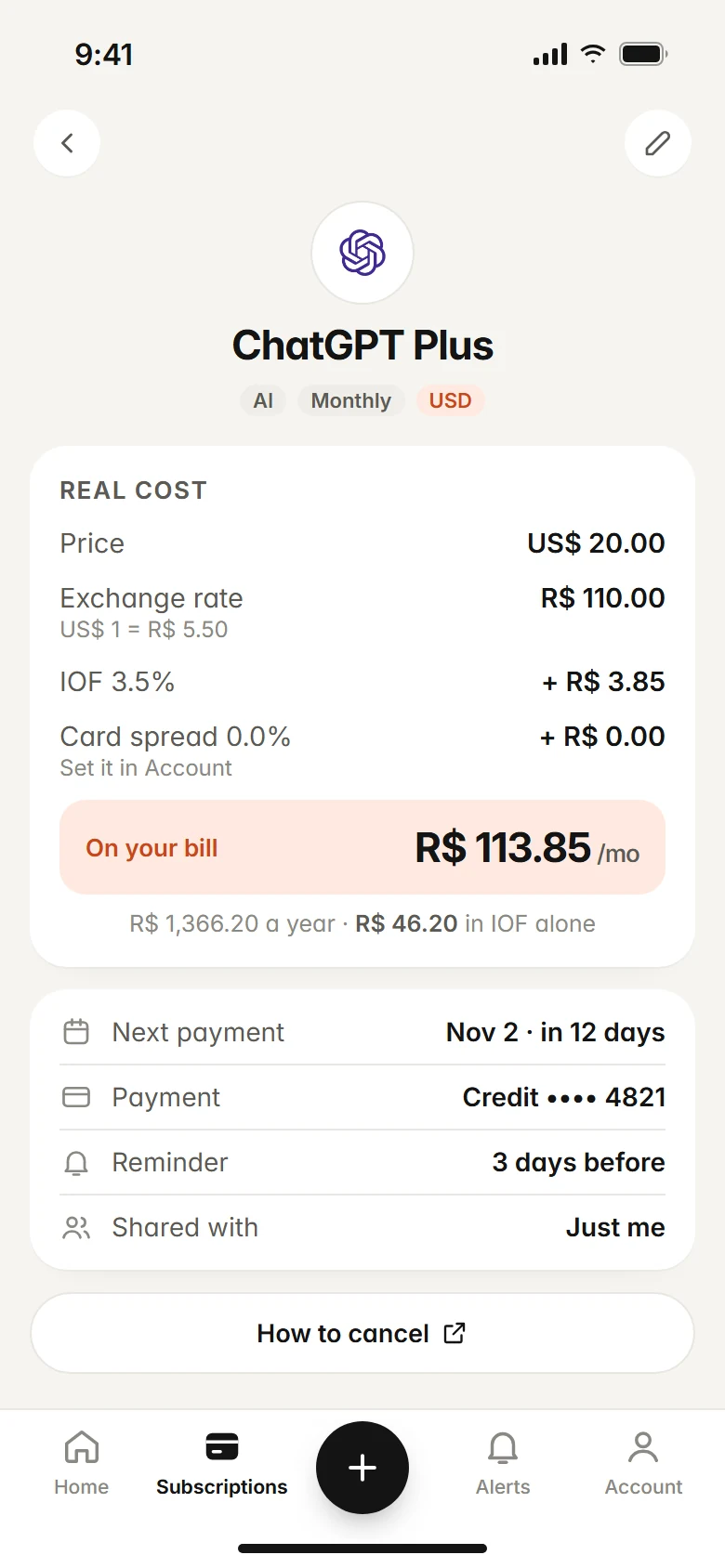
Subfaro does what a spreadsheet can't do on its own: it alerts you before each charge and before free trials end, checks prices for about 30 services every week and flags plan price changes, and shows the real cost of foreign-currency subscriptions including the exchange rate and your card's spread. To see what a foreign-currency service really costs you, try the calculator. If you ever need more than 10 subscriptions, check Pro pricing.
FAQ
Is a spreadsheet enough to track subscriptions?
It is if you have a handful of subscriptions, all in your own currency, and the habit of reviewing the sheet every month. It won't warn you before charges or spot price increases on its own.
What columns should a subscription spreadsheet have?
At minimum: service, plan, amount, currency, billing cycle, next charge, card, shared with and cancel link. That tells you what you pay, when you pay and how to get out.
How do I handle a subscription billed in another currency?
Multiply the amount by the current exchange rate, then add any foreign transaction fee or spread your card charges. In Google Sheets, GOOGLEFINANCE can fetch the rate for you.
Can I move my spreadsheet into Subfaro?
Yes. You can add each row by picking the service and plan from the catalog, upload a card statement so Subfaro finds the recurring charges, or ask Claude to add them through the connector.
Keep reading
All articles →
Guides6 min read
How to Cancel Subscriptions: Netflix, Spotify, Hulu and More
How to cancel subscriptions in the US: the path and official cancel link for Netflix, Spotify, Prime, Hulu, Max and more, plus refunds and remaining time.

Guides6 min read
How to find forgotten subscriptions on your card statement
Find forgotten and duplicate subscriptions on your credit card statement: how charges are labeled, what to check each month and a 30-minute audit checklist.

Money6 min read
Free Trial Ending? How to Avoid Being Charged
How to avoid free trial charges: set reminders, cancel right after signing up, use virtual cards, handle App Store trials and what to do if you were charged.